To start a thread, pick a board.
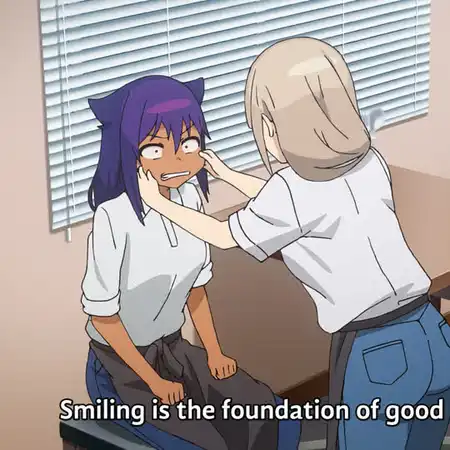
File: aquire_currency.webp (85 KB, 1080x1080)

Webp Anime Reaction images thread #2. Jahy-sama edition.
Archive of #1 (Oreimo S2): https://files.catbox.moe/vvt33l.zip
Workflow:
- Take 1080p anime screenshot in PNG.
- Crop it to 1:1 1080x1080 res (so it looks good on mobile and desktop)
- Resize it to 50% and feed it to the Resrgan upscaler using the Anime-HQ-W4xEX model (found on the waifu2x extension gui on github)
- Resize it to 50% again (ie back to 1080x1080), overall this significantly removes video compression artefacts and sharpens up blurry details.
- Convert to webp using these parameters in cwebp: -sharp_yuv -m 6 -pass 10 -psnr 45
8 replies and 6 images not shown. Open the thread to see all of them.






File: Moderna.webp (50 KB, 802x561)
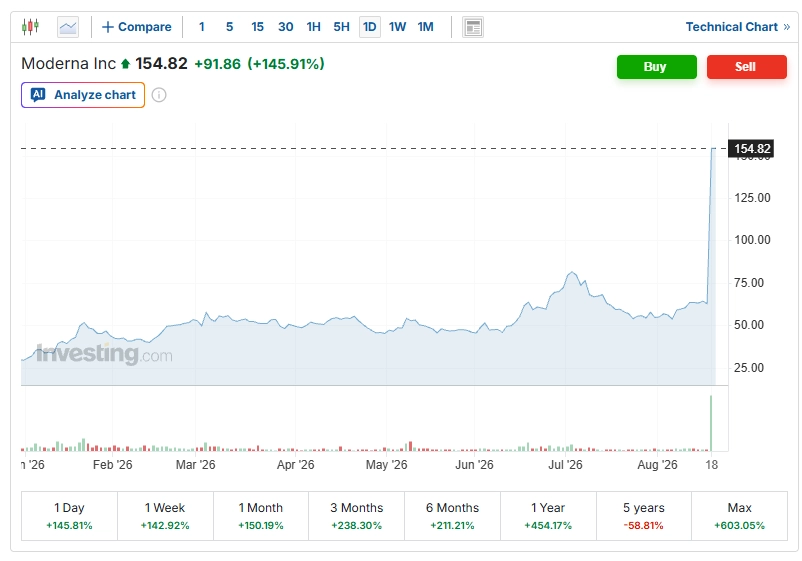
Moderna stock, $MRNA, surges over +145% after announcing the first ever positive Phase 3 results for a personalized cancer vaccine.
1 year:
- Full data to regulators; possible melanoma approval path
- Trials advance in lung, bladder, kidney cancers
2 years:
- Market entry if approved; custom manufacturing constrains supply
- Lower recurrence in high-risk melanoma via T-cells trained on unique tumor mutations
10 years:
- If broader success, adjuvant tool across solid tumors, reducing metastasis by targeting patient-specific antigens
- Scale and cost will gate real-world impact
Anonymous No.

File: q80.webp (106 KB, 540x540)

I made some progress optimizing animated Webp compression. Simple windows batch scripts for now as I improve with Bash.
This takes Screenshot (X).png files and renames them to 01.png 02.png 03.png frames for ffmpeg processingThis scales the frames to 50% size and crops them to 540x540, assuming source is 1920x1080. Also exports them to a new png_444 folder.@setlocal EnableDelayedExpansion & set n=1 for %%f in (*.png) do ren "%%f" "!n:~ -2!.png" & set /a n+=101This converts the png_444 frames into an intermediate RGB video file, may not be necessary...@echo off & setlocal EnableDelayedExpansion mkdir png_444 & for %%f in (*.png) do ffmpeg -hide_banner -i "%%f" -vf "scale=iw/2:ih/2,crop=540:540:(iw-540)/2:(ih-540)/2" -y "png_444/%%~nf.png"ffmpeg -framerate 1 -i %%02d.png ^ -c:v libvpx-vp9 -cpu-used 4 -r 1 -g 1 ^ -b:v 0 -crf 0 -qmin 0 -qmax 0 -pix_fmt gbrp out.webm
File: fuck_that_took_forever.webp (44 KB, 1361x823)
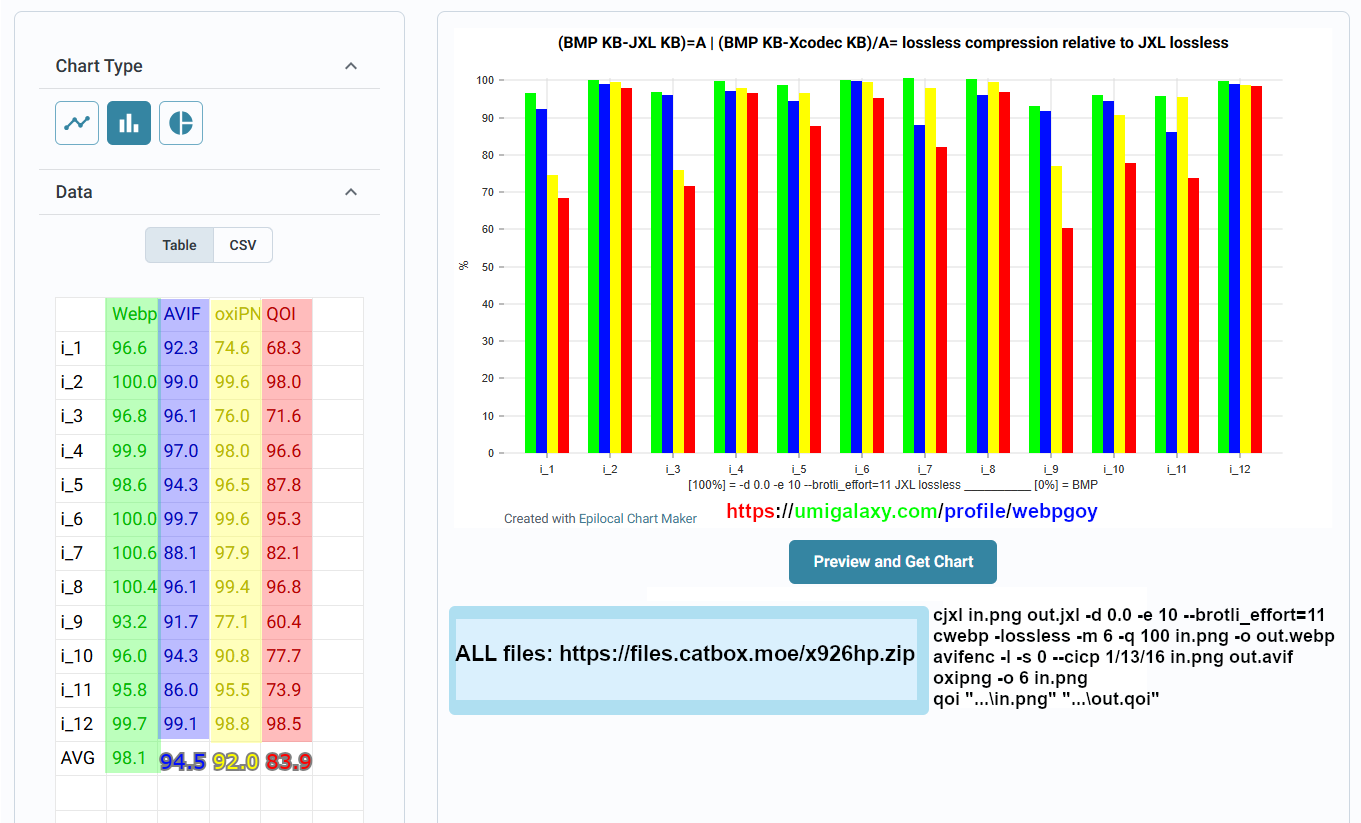
>Relative to lossless JXL filesize, how close in compression does a given lossless image codec get?
That's what I'm trying to answer here. A dozen common type 1920x1080 PNG images were used.
JXL KB = 100% and BMP KB = 0%. Lossless JXL/Webp/AVIF/oxiPNG/QOI tested. Anything above 100% means JXL was defeated.(BMP KB-JXL KB)=A | (BMP KB-Xcodec KB)/A= lossless compression relative to JXL losslesscjxl in.png out.jxl -d 0.0 -e 10 --brotli_effort=11 cwebp -lossless -m 6 -q 100 in.png -o out.webp avifenc -l -s 0 --cicp 1/13/16 in.png out.avif oxipng -o 6 in.png qoi "...\in.png" "...\out.qoi"
ALL files: https://files.catbox.moe/x926hp.zip
Tags: Discussion
28 replies and 12 images not shown. Open the thread to see all of them.
Discussion for the Codex page Movies & TV Shows Codex.
The Codex page is written by this board's curators, so other users cannot edit it. This thread is where everyone else talks about it: post a reply if you have a question, spotted something out of date, or want to suggest what to add.
Discussion for the Codex page Meta Codex.
The Codex page is written by this board's curators, so other users cannot edit it. This thread is where everyone else talks about it: post a reply if you have a question, spotted something out of date, or want to suggest what to add.
Discussion for the Codex page Artificial Intelligence Codex.
The Codex page is written by this board's curators, so other users cannot edit it. This thread is where everyone else talks about it: post a reply if you have a question, spotted something out of date, or want to suggest what to add.
Discussion for the Codex page Technology Codex.
The Codex page is written by this board's curators, so other users cannot edit it. This thread is where everyone else talks about it: post a reply if you have a question, spotted something out of date, or want to suggest what to add.
Discussion for the Codex page Anime & Manga Codex.
The Codex page is written by this board's curators, so other users cannot edit it. This thread is where everyone else talks about it: post a reply if you have a question, spotted something out of date, or want to suggest what to add.